
This is supposed to be a summary of guidelines addressing (web)development.
Especially if multiple team members are working on the same code – but also if one single developer wants to have clean reusable code throughout his application.
Overview
This is mainly all covered in php-fig-rectified/fig-rectified-standards coding standards.
This also extends the standards of CakePHP as well as other resources. There are some differences – especially compared to coding standards like PEAR etc.
In the past some groups arose around that very same matter. Namely FIG and phptherightway.com.
Those ideas are almost completely valid and inherited below.
There are same major and minor issues with some ideas though that cannot be accepted in the form it has been made a modern "coding standard".
The major differences (especially towards PSR-2) are outlined beforehand pretty quick:
- Tabs vs spaces: Only tabs are valid indentation.
- Consistency in {}: Opening braces always on the same line, for control structures, functions and classes
Common
The language is English, both in function/variable names and in comments.
All code lines should be indented properly – this improves readability.
Use one tab as indent – good IDEs can transform them into (soft) spaces (as many as you find suitable).
[‘] or ["]??
Usually I use the normal [‘] – as ["] is for html attributes.
No variables inside strings – they are splitted like that:
echo 'A string with '.$someVariable.' and '.SOME_CONSTANT.'!';
echo '<a href="http://example.org" title="' . $title . '">Link</a>';
This increases readability most of the time.
The other case I use ["] is inside query functions of the database object, where [‘] is needed to escape strings.
Note: The Cake Core usually puts spaces between . separated strings like $value . $value2 – you should do that this way, as well. In the past I did not always respect that, but I started to migrate my code according to the Cake conventions.
Important Definitions
CamelCase: all the words have a capital – no whitespaces
camelBack: first word has a minuscule, all following ones have a capitel
snake_case: all lowercase and separated by an underscore
function: normal php function (for itself)
method: function INSIDE a class – usually the case in CakePHP
object: instantiated class
PHP
Methods and variables usually are in camelBack:
public function xyzAbc($someVar = null) {
    ...
    return $someOtherVar;
}
Also note that methods should either be declared public or protected (never private). Same goes for class attributes.
Don’t use magic numbers (like a literal 3) directly in the code. Try to use constants for them as they are more verbose and tell the developer right away what they stand for.
HTML
All tags and attributes are lowercase.
JS
All functions are camelBack.
All style attributes have to be lowercase:
/* would not work properly: */
document.getElementById('xyz').style['Color'] = 'black';

/* it has to be: */
document.getElementById('xyz').style['color'] = 'black';
CSS
Definition:
class: .some-class-name

id: #some-id-to-an-element
both with lowercase characters (although classes are not case-sensitive, id’s are!),
the separator is minus [-]. You can use underscore [_] if it makes the separation of the identifier and the record id easier. E.g. "my-id_33". It will become necessary to do so if you use UUIDs (which contain minus chars).
Note: ids should be unique on the current page – so don’t use them for iterating elements. In general all styling should be class based. Ids are often abused for that. But
they usually serve the purpose of being identifiable via JS. So they should ideally be mainly used for dynamic JS stuff.
Do not name the fields after their style, but after the function/meaning – as the style can change and will result in things like ".red { color: yellow;}"
Good Example:
span.success {
    /* color: green; // not any more */
    color: dark-green;
}
div.important {
    /* font-weight: bold; // not any more */
    font-size: 14px;
}
Use Inheritance. And – to avoid, that any added style for other pages affect the current one, declare the inheritance the following way:
div.report {
    margin-left: 12px;
    background-color: #E6E7E8;
}
div.report table {
    width: 330px;
    border-collapse: separate;
}
div.report table th {
    font-weight: bold;
}
div.report table td.descr {
    text-align: center;
}
Now, the .descr class on the td of this table does not get screwed up, if there is any other .descr in the stylesheets.
Code Documentation
Especially inline-documentation is quite important. Not only for others, but also for yourself to be able to understand what you did some months/years ago.
All comments should in a clear way describe what is going on.
PHP:
Use /* */ for longer comments and // Some comment for one-line comments (usually right above the code).
I recommend to always add a space after // as without that space it usually stands for some line of code commented out – which can lead to misunderstandings.
You should also comment all your methods/functions – take a look at the different tags available.
Example:
/**
 * Method description here
 *
 * @param string $var Dirty name,
 * @return string Cleaned name.
 */
public function someFunction(string $var): string {
    ...
    // Now we need to shift the array
    $var = array_shift($var);
    ...
    return $var;
}
With a good php editor (like PHPStorm), you are able to use these method comments while programming (as it pops up on each method/function as soon as you click inside the brackets (even beyond the current page – as the editor looks through your complete app directory)
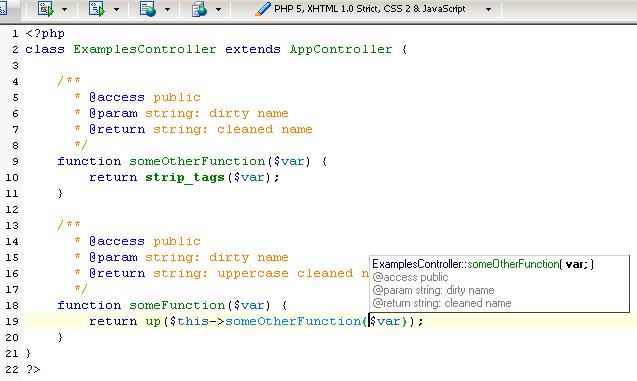
All functions/method should have @param (if applicable) and @return statements. Only constructors/deconstructors don’t have @return statements.
JS
Use /* */ for comments (usually above the code).
Although // would be allowed as well – this is (as in PHP) usually code commented out.
CSS
In CSS documents there is just the /* */ to comment your code (usually above).
You should built some kind of hierarchy with them – if you have any.
Appendix
The PEAR Package contains some tips about "best practices".
Hi guys,
it’s always interesting to see how others think about coding guidelines / standards.
Personally I like it more if the { open bracket is in a new line. For me it’s a better overview, but everyone has to make his own decision I think?!
But this is a nice introduction to new developers =]
I hate it!
It’s on of the things that really upsets me about other code if the {} brackets are not correctly set^^
everything is debatable, but not this, in my opinion.
grrrr
I agree with iNaD, having the { open bracket on a new line is a lot cleaner. This way you will have the open and close bracket on the same column (position vertically) and this makes it easier to see what code block it belongs to. If you put it on the same line it (in my opinion) looks crooked. Especialy when you have a lot of nesting with many ifs/foreaches/etc.
I wonder what your reasons are for doing this, because you didn’t post an explanation for this opinion. Just wondering…
Great blog by the way!
You are right
I covered it only briefly in
http://www.dereuromark.de/2011/01/16/coding-standards-in-php/
As stated, the readability increases dramatically (indentation is the keyword here). Your argument was strong when programmers didn’t use IDEs but pure txt-editors. But nowadays with a proper IDE you get the opening and closing bracket highlighted(!). That + the intendation is enough to make any code readable very beautifully.
And the main disadvantage of the new line style (did I already say that i hate it?^^) is that it triples(!!!) in most cases the length of the function. Totally nonsense in my opionion. Some (usually not very well written) functions can even extend the height of the screen, and there you are happy if no nonsense-lines are added 🙂
Example:
(good)
(bad)
To emphasize for all those souls that are lost on the wrong path here:
The closing bracket is on the same vertical alignment as the condition/text that started it.
Thats about all that is needed.
Thank you for adapting proper indentation.
No matter what is good about PSR, I hate it because they have poisoned countless PHP projects by adapting outdated, incorrect indentation. [Some number of hard space characters] to make one indent.
I hope that one day CakePHP will start using correct indentation, instead of following PSR — the standard that has stained so many web projects with collectively easily gigabytes of extra storage space just from the unneeded characters from the incorrect indentation standard. PSR, to some degree, has slowed down the web. Not everyone minifies HTML output, or uses output compression, so essentially PSR itself is single-handedly responsible for slowing down the web to some degree. And responsible for increasing many people’s mobile bills marginally from a little extra wasted bandwidth.
Improper, unideal indentation is just about the only bad and nonsensical thing about CakePHP. Other than that fairly major issue, it’s a truly incredible framework.